Access to Advertising Platforms
Access to Other Advertising
Drive Marketing may require access to your advertising platforms to manage campaigns, monitor performance, and optimize your paid marketing strategy.
Providing access allows our team to configure campaigns, analyze advertising performance, and make adjustments to improve results.
This guide explains how to grant access to the following platforms:
- LinkedIn Ads
- TikTok Ads
- Pinterest Ads
- Display & Video 360 (DV360)
LinkedIn Page
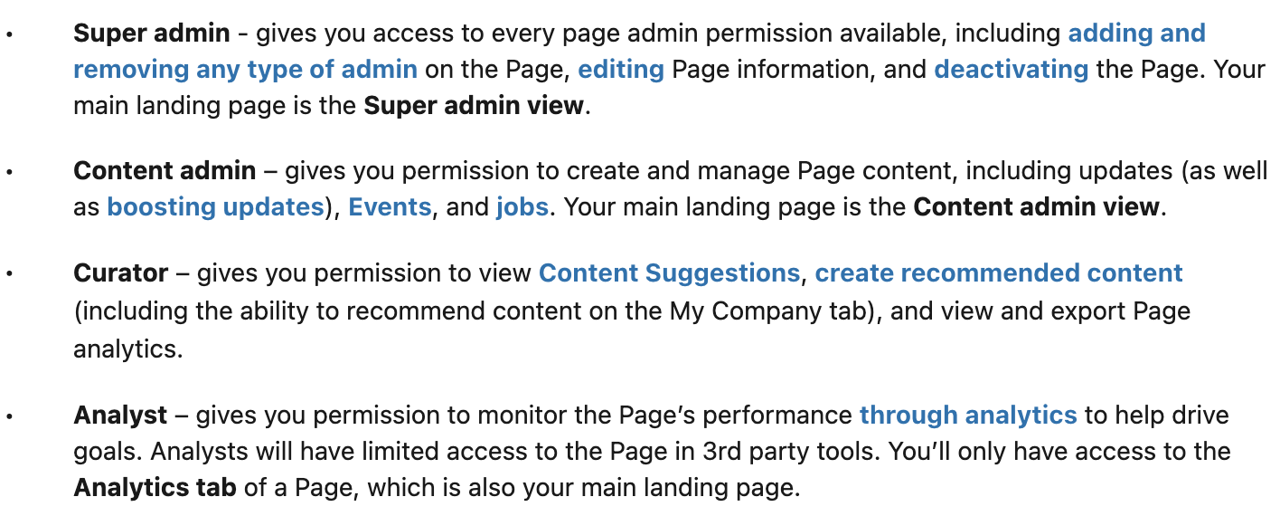
Drive Marketing may require access to your LinkedIn Company Page to manage content and monitor page performance.
Grant Access
- Open your LinkedIn Company Page
- Enter Admin View
- Click Admin tools at the top of the page
- Select Manage admins
- Click Add admin
- In the search field, type:
Sheldon Poon - Select the correct profile when it appears
- Assign the role Super admin
- Click Save
LinkedIn Ads
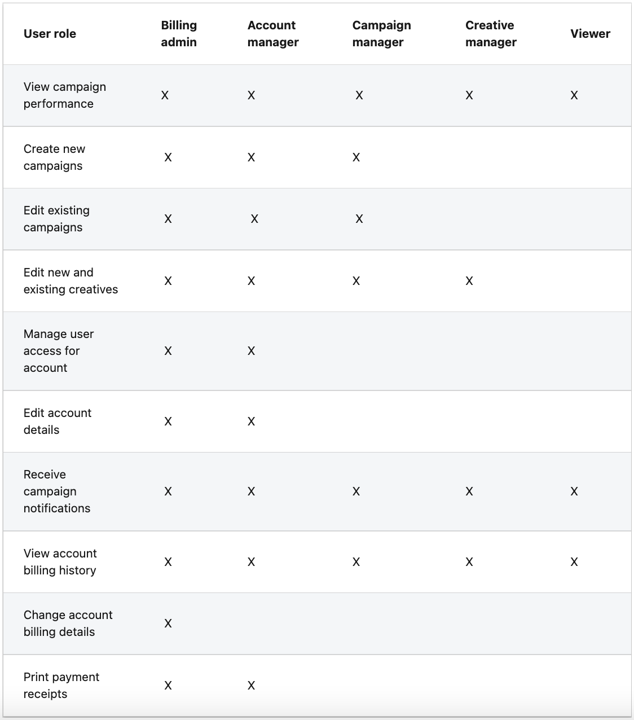
Drive Marketing may require access to your LinkedIn Campaign Manager account to manage advertising campaigns and monitor performance.
Grant Access
- Log in to LinkedIn Campaign Manager
- Click the account name in the upper-right corner
- Select Manage access
- Click Edit in the access management window
- Click + Add user to account
- Enter the name of the user or their LinkedIn profile URL
- Select the correct profile from the drop-down list
- Assign the role Account Manager
- Click Save changes
TikTok Advertising Account Access (Client ID)
Introduction
Drive Marketing may require your Client ID (Ad Account ID) from TikTok Ads Manager to request access to your advertising account.
Share Your Client ID
- Log in to TikTok Ads Manager
- In the top right corner, click the account dropdown / search bar
- Locate your Client ID (Ad Account ID)
- Copy and send the ID to [email protected]
Important:
- The Client ID is typically a 19-digit number
Approve Access Request
Once we submit a request:
- Log into TikTok Ads Manager
- Click the Notifications icon (top right)
- Go to the Business Center tab
- Approve the request
Note:
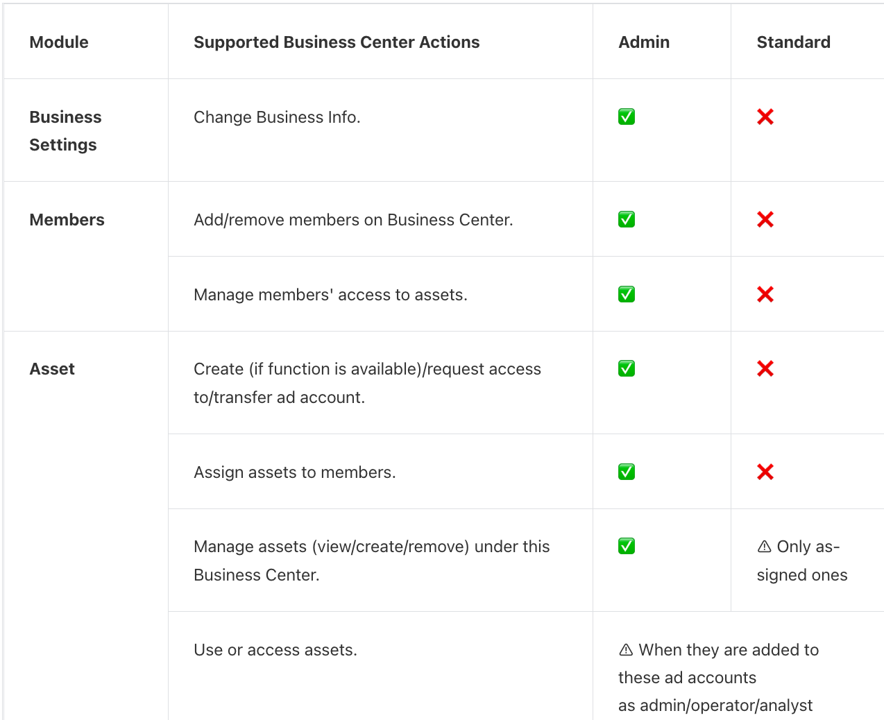
- If your account is linked to a Business Center, an admin must approve the request
- If it is an individual account, the account creator must approve
Notes
- Your TikTok business profile is different from Ads Manager — the Client ID is only found in Ads Manager
- Ensure you are in the correct ad account
- You may need admin permissions to view or approve access requests
Pinterest Ads
Drive Marketing may require access to your Pinterest Business Account to manage advertising campaigns and monitor performance.
Grant Access
- Log in to your Pinterest Business Account
- Click the chevron icon in the top-right corner
- Select Business Access
- Click Partners in the left-hand menu
- Click Add partner
- Enter the following Business ID:
940759947069739169 - Select Invite a partner to access your assets
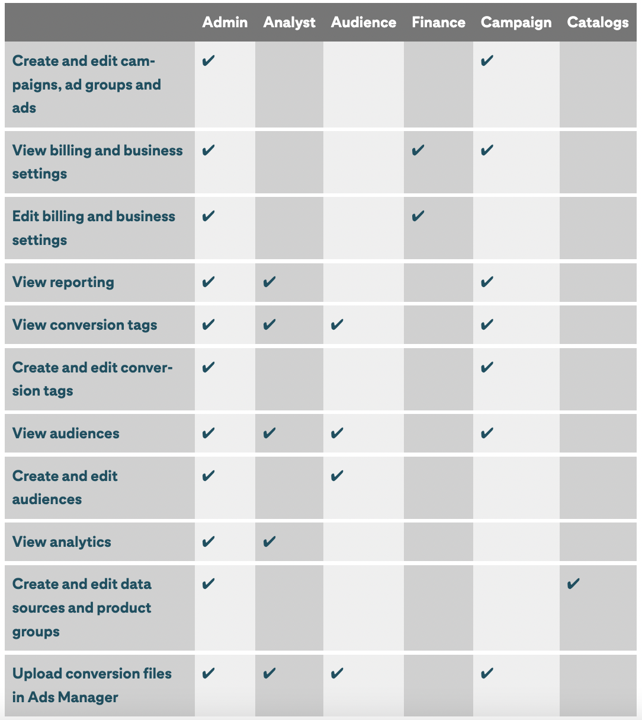
- Assign the advertising assets you want to share
- Click Save
Display & Video 360 (DV360)
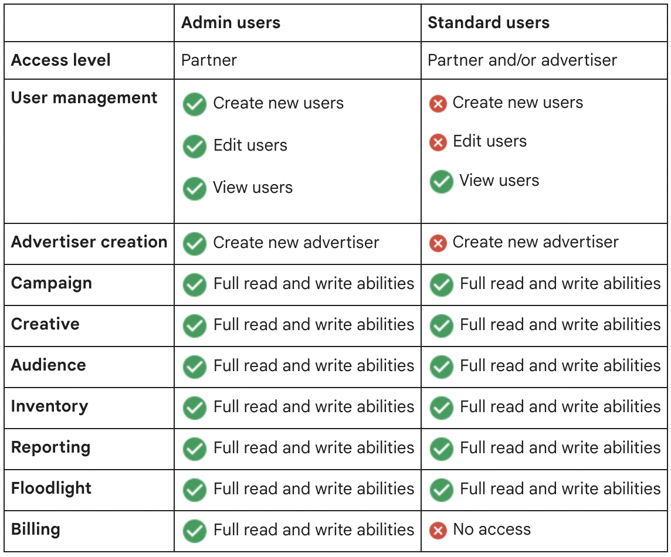
Drive Marketing may require access to your Display & Video 360 account to manage programmatic advertising campaigns.
Grant Access
- Log in to Display & Video 360
- In the upper-right corner, open User management and notification settings
- Select User management
- Click New user
- Enter the following email address:
[email protected] - Click Add partners or advertisers
- On the next page, select Drive Strategie
- Assign the role Standard user
- Click Save