Allow Custom Apps in Shopify
Enabling Custom Apps in Shopify
This guide explains how to enable Custom App Development in Shopify. This setting allows developers to create private integrations that connect your store to external services or tools.
If Drive Marketing is assisting with development, this step allows our team to build and install custom integrations for your store.
1. Open Shopify Settings
- Log in to your Shopify Admin Dashboard.
- Click Settings in the lower-left corner of the screen.

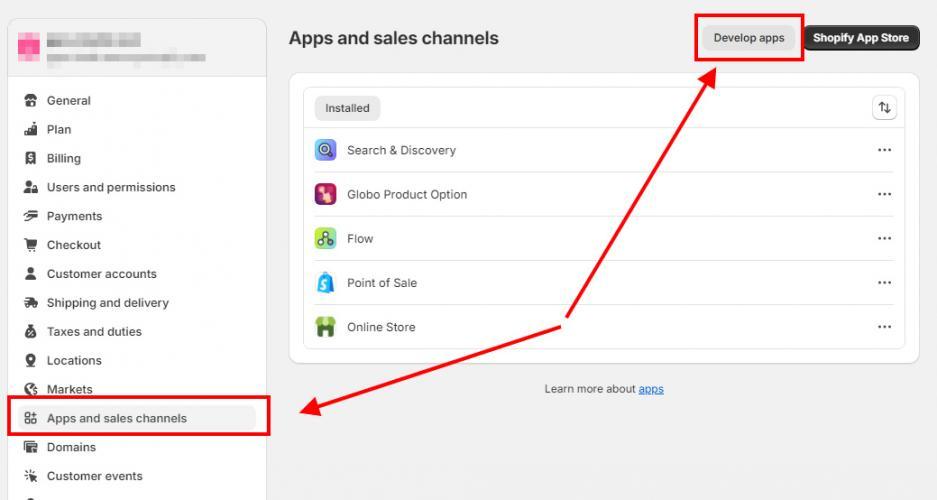
2. Open Apps and Sales Channels
- Click Apps and Sales Channels.
3. Open the Custom App Settings
- Click Develop apps.
If this option does not appear, Shopify will prompt you to enable custom app development.
4. Allow Custom App Development
- Click Allow custom app development.
- Review the information provided by Shopify.
- Click Allow custom app development again to confirm.
This setting allows developers to create custom apps for your store.
Confirmation
Once this setting has been enabled, custom apps can now be created for your Shopify store.
- If you are a Drive Marketing client, please notify your Account Manager or Development Team once this step is complete.
- If you are a developer, you can proceed to the Create Custom Apps in Shopify documentation to continue the setup process.